Quick Answer
Selling used or one-of-a-kind items on Shopify works best when you have a clear system for listing and archiving products. Making a few small tweaks to how your store handles marketing, pricing, and shipping also helps your store work better for this kind of marketplace. This article explains how to set everything up.
Why This Approach Works for Used and One-Off Items
Selling used or one-off items on Shopify needs a different setup because every product is unique, sells once, and has its own condition, price, and shipping needs. A simple process for photos, descriptions, pricing, and removing sold items works well because it keeps your store organized and prevents common mistakes like overselling. Small updates to how you price items, handle negotiation, and set up shipping also help you capture more sales in a marketplace where customers expect flexibility. Shopify can support all of this with a few easy settings and tools, which makes this approach worthwhile and a strong opportunity for merchants who want to grow this kind of business online.
Selling Used or One-Off Items: What Makes This Different for Shopify Merchants
When you think of selling used items, you probably think of secondhand marketplaces like eBay or Kijiji, but a lot of merchants use Shopify to sell secondhand, vintage, or one-of-a-kind items too.
I’ve worked with hundreds of merchants who run successful businesses selling everything from luxury bags and sunglasses to antique furniture, jewellery, vintage clothing, and everyday secondhand items. Their Shopify stores make up a big chunk of their sales.
Selling used goods on Shopify is completely doable. The real question is: how do you do it well? Before your store starts running smoothly, you need to understand the challenges that make this type of business different from selling restockable products.
When I talk to these merchants, the same four challenges come up every time:
- How do I get customers to find me?
- How do I manage my inventory and list products efficiently?
- How do I charge a fair price?
- How do I handle shipping and returns?
The answers to these questions are unique to merchants selling used or one-off goods because these merchants will encounter different kinds of challenges.
One of the hardest parts of running a business is dealing with problems you didn’t see coming. In this article, I’ll walk through the four questions above so you can spot common pitfalls early and learn how to sell used or one-off products on Shopify without the usual headaches.
How do I get customers to find me?
Some shops already have a bit of a reputation, especially if you’re a physical storefront. In that case, your job is to make sure your real-world presence shows up online. Register your business on Google, claim your profile on Yelp, and even consider community-driven spaces like Karrot or eBay if you sell the kind of items people browse locally.
If your store is newer or fully online, you need a reliable funnel that brings people to you. SEO is one of the best long-term strategies for this, and we have some tips and tricks in our guide for that. But a lot of one-of-a-kind sellers get just as much (or more) traction from TikTok, Instagram, and Facebook Marketplace. Short-form videos where you hold up each item you sourced that day make great content and help people see what’s coming to your store. Or better yet, you can also share your hauls on Tiktok Live like this merchant.
It’s also worth taking advantage of Shop Pay and the Shop app. Once you're set up, customers who follow your store on Shop get updates, recommendations, and easier checkout. It’s almost like having a built-in repeat-customer engine you don’t have to manage yourself.
And finally, having a niche goes a long way in this world. If you specialize in a niche, like name-brand luxury bags, customers trust your eye, your authentication knowledge, and your appraisal skills. That expertise is part of your brand, and it makes buyers feel safer spending money on one-of-a-kind items.
Managing One-of-a-Kind Inventory
There are 3 things to think about when selling one-of-a-kind or used goods:
1. Archiving Products
Shopify was built to handle restockable products you refill over and over again. The problem with one-of-a-kind sellers is that the workflow runs in the opposite direction: every item is unique, it sells once, and it needs to disappear from your store the moment it’s gone.
I spoke to an antique dealer atBloomsbury Fine Art who said, “We’re always looking for a more accurate way to manage one-of-a-kind items. Everyone in sales and bookkeeping doesn’t know when something is sold. It would be amazing if Shopify could automatically archive the product the moment it sells.”
This was something I heard over and over again from vintage and secondhand sellers. How you handle it mostly depends on what Shopify plan you’re on.
If you’re on Shopify Plus, you can create a workflow that automatically archives the product the moment inventory hits zero. It can take the product off your online store instantly, without you having to touch anything. It’s great, but Shopify Plus is $2,300/month, which isn’t realistic for most merchants selling used or unique intake items. If you’re not on Plus, then the realistic approach is to mark sold items clearly and archive them in batches. To do this, go to Products, filter by Active, and sort the Inventory column so anything with 0 stock appears at the top. Select the sold-out products, click More actions, and choose Archive products.
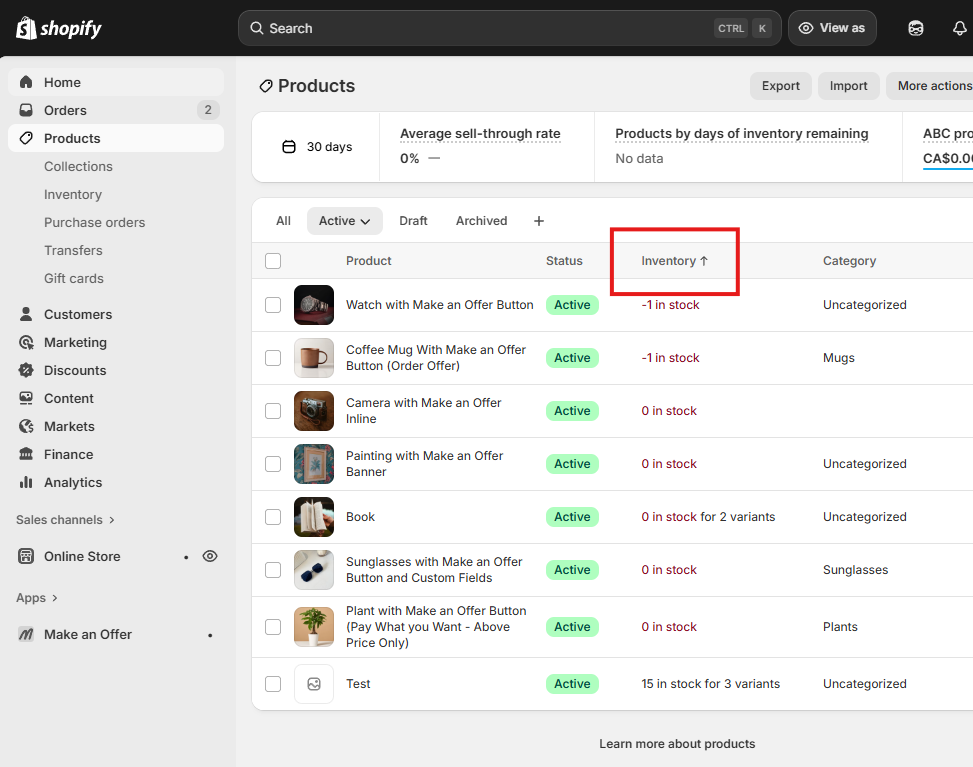
Select the "Active" filter and then sort products by Inventory (ascending).
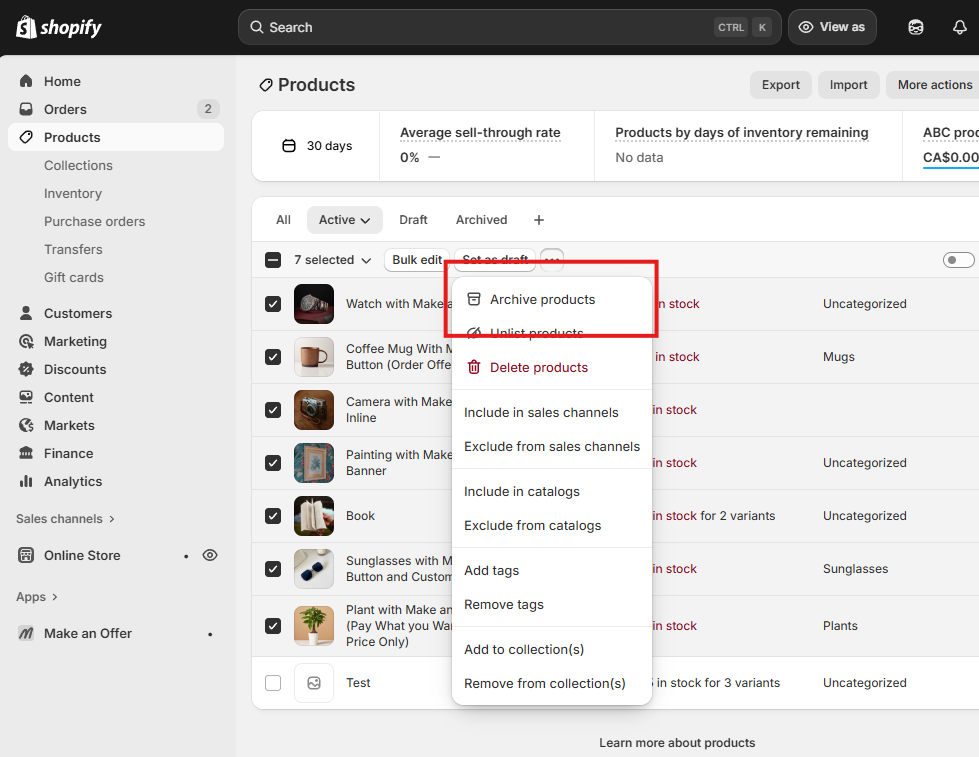
Bulk select products, click the three-dot menu for more options, and select 'Archive products'.
Sold-out product pages will stay live and keep showing up in search results, so adding a simple “Sold” badge to each sold listing is a good idea.
2. Managing the Manual Workflow Burden
If you sell used or one-of-a-kind items on Shopify, the toughest part is the repetition. Every item needs photos, a description, a price, and its own product page. And when it sells, you start over. There’s no shortcut around that.
Most merchants I’ve talked to eventually build a simple system so it doesn’t feel overwhelming. They keep a consistent photography setup, reuse the same description template, and upload items in batches. Condition notes can be short (“Great vintage condition. Minor wear”), as long as you show clear photos from all angles. Six to twelve images is likely sufficient.
None of this removes the work, but it does make it easier. When you follow the same steps every time, listing becomes faster and more automatic. A simple routine goes a long way when you’re handling one-of-a-kind items every day.
3. Removing the Quantity Selector
If you’re selling one-of-a-kind items, the quantity selector will likely cause issues. Customers shouldn’t be able to add “2” of a vintage lamp that only exists once, but Shopify’s default product page doesn’t know that. Merchants on the Shopify Community ask about this constantly because it leads to customer confusion, overselling, or abandoned carts.
One merchant put it perfectly in a thread: they needed to remove the quantity field entirely because customers kept thinking they could buy more than one of a unique item. Several Shopify Partners jumped in with the same answer: hide it.
The simplest fix is to remove the quantity selector in your theme customizer.
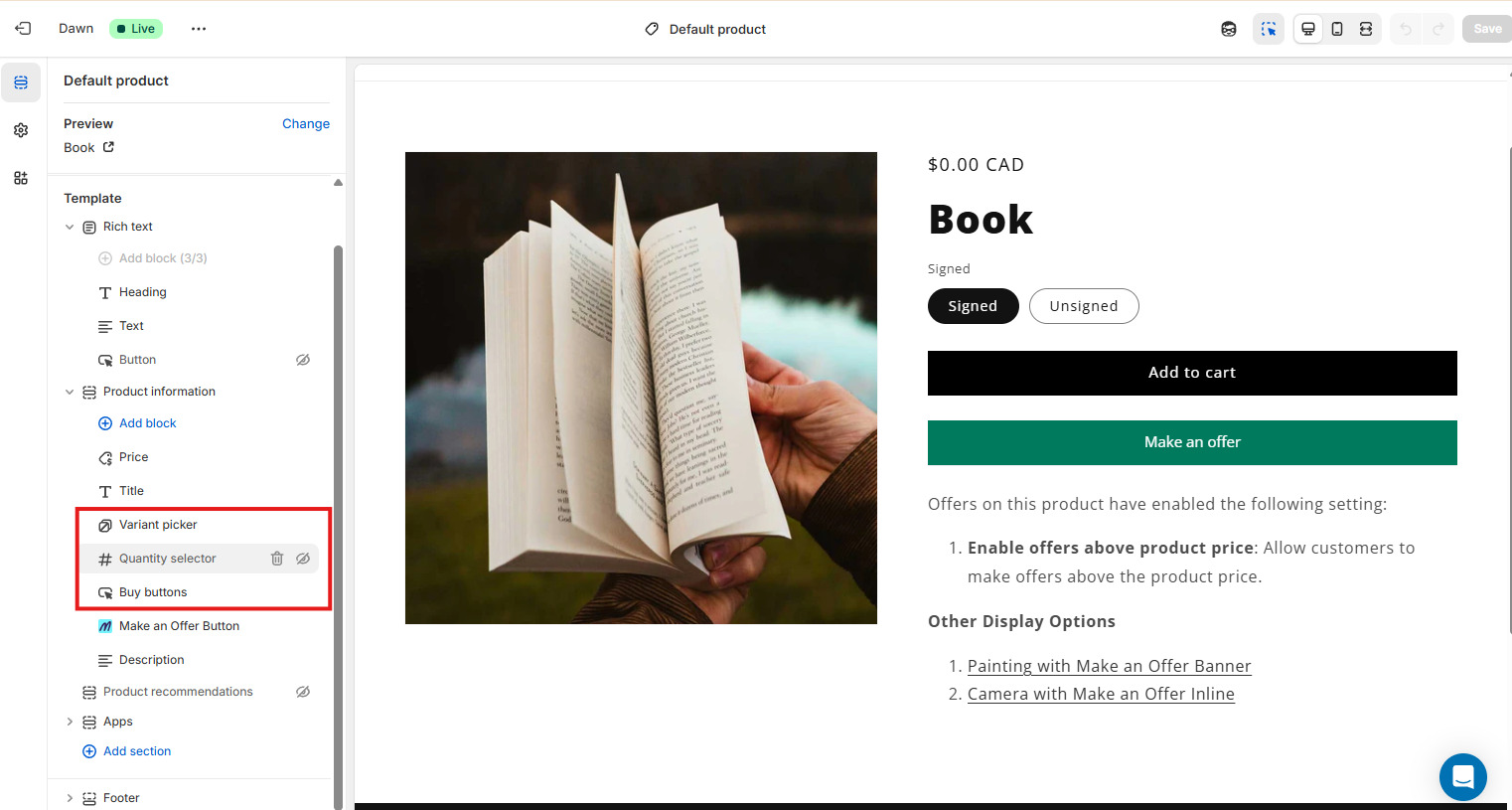
If your theme doesn’t offer that toggle, you can hide it with a few lines of CSS on both the product page and cart page. And if you want a hard rule (so customers can’t bypass it), apps like KOR Order Limits let you cap the max quantity at 1.
It’s a small tweak that makes the buying experience feel way more aligned with how one-of-a-kind items actually work.
Pricing Used or One-Off Items (And When to Allow Offers)
Pricing gets tricky when every item is unique. There’s no standard market value to lean on, so condition, demand, and rarity all play a role. Most merchants told me they rely on a mix of gut instinct, comps from marketplaces like eBay or FirstDibs, and what similar items have sold for in their own store. The real variable is how flexible you want to be.
Negotiation matters a lot more with used and one-of-a-kind pieces. Some customers expect to make an offer, while others simply want a way to ask if the price is firm. Shopify doesn’t make this easy. There’s no built-in offer or quote feature.
A Make-an-Offer tool works best for lower- to mid-value items under $1,000 where you’re open to accepting offers. Free-to-install apps like Magical Make an Offer let customers submit an offer and give you a chance to accept, decline, or counter it. If you get a lot of offers, you can set up simple automations to save time and filter out low-ball bids.
If you’re selling higher-value items over $1,000, a Request-a-Quote button usually works better. In the Shopify Community forums,merchants who asked how to add a basic quote request button were often told they’d need custom Liquid, a Mechanic automation, or a developer to build it. By comparison, Make-an-Offer apps are much easier to install and don’t require any custom code.
For high-value art, furniture, or antiques, a quote request form also feels more professional and lets customers share details before you decide on a price.
The main idea is simple: match the negotiation style to the value of the item and use the right tool for the situation.
How to Handle Shipping and Delivery
Shipping one-of-a-kind items comes with its own challenges. These products are not always easy to ship. They can be heavy, oversized, fragile, or imperfect. If you do not set clear expectations up front, you can end up losing money on shipping or dealing with disputes, chargebacks, and negative reviews.
A used auto parts dealer I spoke to in Canada said it well: “People buy giant items and then pay the base shipping rate when really they should be paying more than 30 dollars.” This happens often with used or secondhand stores because every item has different size, weight, and shipping needs.
Local storefronts: offer delivery with a small delivery fee
If you have a physical store, offering local delivery is a simple way to help nearby customers and doesn’t require a complicated setup in Shopify:
- Go to Settings → Shipping and Delivery2. Under Local Delivery, choose your location3. Turn on Local Delivery4. Set your delivery zone using postal codes or a radius around your store5. Add a delivery fee, such as 5 or 10 dollars
This works well for furniture, home goods, and anything that is too big or awkward to ship affordably. A small fee helps cover your time and gas while giving customers a smooth experience.
Long-distance shipping: charge more for big or heavy items
If you ship large items to customers who live far away, you may need to charge more than your normal shipping rate. Flat-rate shipping often does not work here because you will lose money on big orders.
This is where location-based fees help. You can use an app like Magical Fees to add an oversized item fee, charge more for certain postal codes, add a special handling fee, or apply the fee only to certain products.
For example, you might add a 20 dollar large item shipping fee for orders outside your city or a 50 dollar heavy item fee for customers in another province or state. These rules only show when needed, so customers see a clear breakdown of costs.
Clear policies prevent headaches
For most used item sellers, treating products as final sale is the safest path. Make this clear on the product page. Pair it with honest condition notes and clear photos so customers know exactly what they are buying. When customers understand what to expect, you avoid confusion, returns, and disputes.
Always label deposits separately for compliance
Display bottle deposit fees as a clearly labeled, separate line item at checkout and on receipts. This meets regulatory transparency requirements, builds customer trust by showing exactly what they're paying, and makes it significantly easier to track deposits for reporting and audits. Use a clear label like "Bottle deposit" or "Container deposit (CRV)" so customers immediately understand the charge.