This guide is for Shopify merchants whose smallest orders are eating into (or completely wiping out) their profit once you factor in picking, packing, packaging, and payment processing costs. Use it as a plain-language starting point for thinking about small-order handling fees, free-shipping thresholds, and how to show a fair, transparent “small order handling fee” at checkout with an app.
This guide is for general information, not legal, accounting, or tax advice. Your exact approach should be shaped by your margins, your customers, and any local consumer-protection rules. Always confirm details with your accountant and, where appropriate, legal or tax advisors.
Quick Answer: What’s the Best Way to Protect Your Margins on Small Orders with a Handling Fee on Shopify?
On most Shopify stores, every order comes with fixed “per-order” costs that don’t shrink just because someone only bought a $20 item, like:
- picking and packing time- packaging materials- label printing / fulfillment tools- payment processing and platform fees
On very small baskets, those fixed costs can wipe out your profit, which is why many ecommerce brands use things like free-shipping thresholds, minimum order values, or small-order surcharges to protect margins.
Because adding product and order fees on Shopify isn't native to the platform, adding a handling fee that only applies to low-subtotal orders isn't normally possible. The simplest approach is to use an app like Magical Product Fees to:
- automatically add a clearly labeled “Small order handling fee” on orders below your chosen threshold (e.g. under $40)- leave larger, more profitable orders untouched- keep the fee transparent so customers understand what they’re paying for
If you’re seeing lots of low-value orders and suspect some are unprofitable, you can: pick a sensible threshold based on your cost-per-order, set up a flat order-level fee below that amount, and then watch conversion, average order value, and small-order profitability over the next few weeks.
Detailed Answer: How to Use a Handling Fee to Protect Small-Order Margins on Shopify
Merchants know all too well that big orders look great on paper, but tiny orders quietly burn cash. A $25 order that costs you $8–$10 to pick, pack, and ship can be a net loss, even if your headline product margins look strong.
In this section, I’ll walk you through:
- why small orders are such a problem, 2. why common workarounds aren’t enough, 3. and a practical way to use the Magical Product Fees app to add a fair, clearly labeled handling fee on only the orders where you actually need it.
Over the past few years working on Magical Product Fees, I've helped hundreds of merchants to set up product and order fees on their Shopify stores. Our team has helped merchants use handling fees in a variety of very practical situations: a B2B store adding a 5% handling fee to every order, a merchant charging a one-time $135 “shipping & handling” surcharge on an oversized product, and more.
Most of the real-world work has been less about the theory of handling fees and more about getting the mechanics right in Shopify: making sure the fee actually appears, can’t be skipped, shows as its own line item instead of being buried in shipping, and can be refunded cleanly when a store chooses to waive it. In this section, I’ve pulled those lessons together into a simple approach you can adapt to your own small-order margin problem.
Why small orders can quietly destroy your profitability
Every ecommerce order carries a mix of variable and fixed costs:
- Variable: product cost, some portion of shipping, transaction fees as a % of order value.- Fixed per-order: labor to pick and pack, packaging, labels, admin time, and often a minimum shipping charge.
For larger orders, those fixed costs are spread across more revenue. For very small orders, they dominate:
- If you pay a 3PL or warehouse a per-order pick/pack fee, that charge is almost the same whether the order is $15 or $150.- Most major carriers use minimum shipment charges and per-order fees, which means very small, low-value orders often cost more to ship than merchants expect.- Packaging, labels, and support time don’t shrink in proportion to order value.
That’s why many merchants introduce minimum order values, free-shipping thresholds, or explicit “small order fees” once they realize that orders under a certain basket size are break-even at best.
Why common workarounds fall short
When merchants notice they’re losing money on small orders, they often try one (or several) of these approaches:
1. Raising prices across the board
You can increase your product prices or standard shipping rate to cover small-order losses, but this makes you less competitive for everyone, including profitable customers. It also hides the real reason for the increase and gives you no levers to tune small-order behavior separately.
2. Using a hard minimum order value
Many brands set a minimum order value or “you must spend at least $X” rule. While this can work, a hard wall can be jarring for customers who just want one or two items, and may hurt conversion if they don’t want to add more to cart.
3. Increasing shipping rates for everyone
Raising baseline shipping charges to cover small-order margin issues means larger orders get over-charged relative to what they cost you to fulfill. It can also make your shipping prices look uncompetitive in comparison tables and marketplaces.
4. Trying to “hide” a handling fee
Folding a small handling fee into generic “shipping” or “service” charges makes it hard for customers and for you to understand where their money is going. It also complicates your ability to tweak that fee over time.
5. Manually editing orders in the admin
Adding a handling charge by hand to tiny orders doesn’t scale. It depends on someone noticing the low subtotal and remembering to add a fee, which leads to inconsistent treatment, errors, and internal frustration.
All of these add friction and muddle your pricing story. A small, clearly labeled handling fee just on unprofitable small orders gives you a much more precise lever without redesigning your entire pricing model.
A practical way to handle small-order margins with Magical Product Fees
While Magical Product Fees can’t decide which of your orders are profitable or tell you exactly where to put your free-shipping threshold, it can help with the mechanical piece Shopify struggles with:
- Adding a flat, per-order fee as its own line item at checkout and on the order summary.- Targeting that fee using order subtotal conditions (for example, only when the subtotal is below $40).- Optionally scoping it to specific locations (for example, only for domestic or only for remote regions where shipping is more expensive).- Letting you update or remove the fee quickly as you learn more about customer behavior and margins.
The idea is simple: use an order-level “Small order handling fee” that only triggers on orders below your chosen profit threshold, and leave everything else untouched.
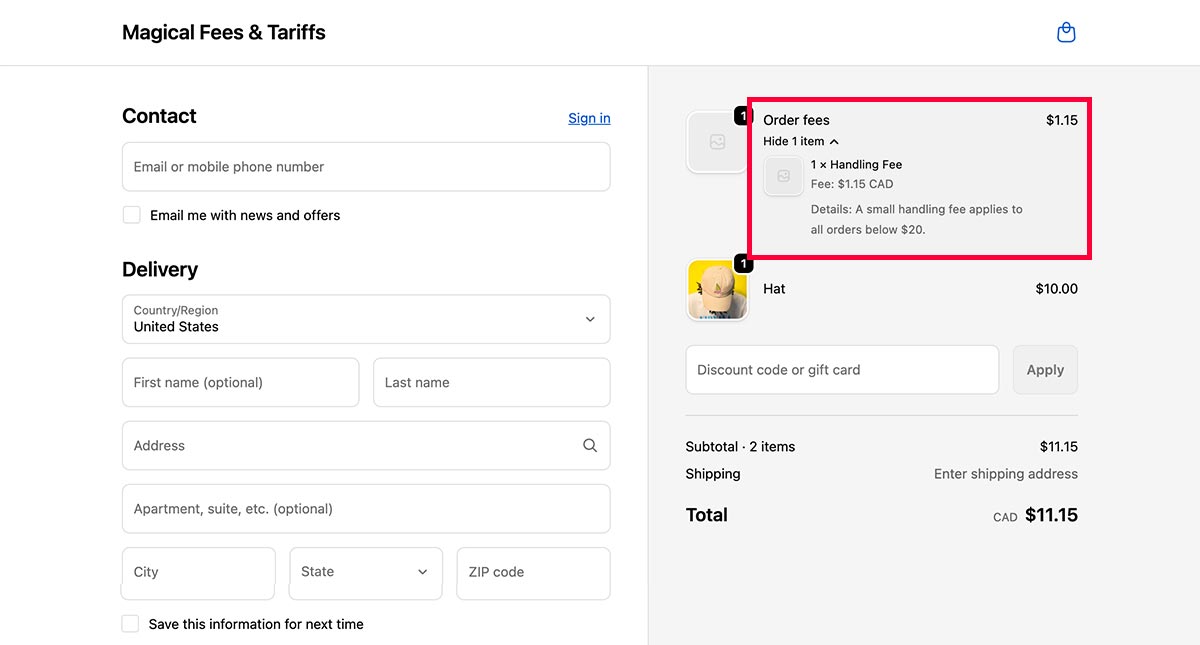
Below is one way to approach it in three steps.
Step 1: Estimate your per-order costs and pick a sensible threshold
Start by getting a rough estimate of your per-order cost to fulfill a typical order:
- Picking and packing labor (or your 3PL’s per-order fee).- Packaging and inserts.- Payment processing and platform fees.- Average outbound shipping cost for the smallest parcels you send.
Then, look at your product margins and find the point at which small orders become uncomfortable. For example:
- If an order under $35 often leaves you with only a dollar or two of profit after fulfillment and shipping, that’s a good candidate zone for a small-order fee or a higher free-shipping threshold.
Pick:
- A threshold (for example, orders under $40).- A fee amount that closes most of the gap (for example, $2–$4), without feeling punitive.
You can refine the exact numbers later, but starting with something grounded in your actual cost structure keeps the fee defensible if customers ask about it.
Step 2: Configure a “Small order handling fee” rule in Magical Product Fees
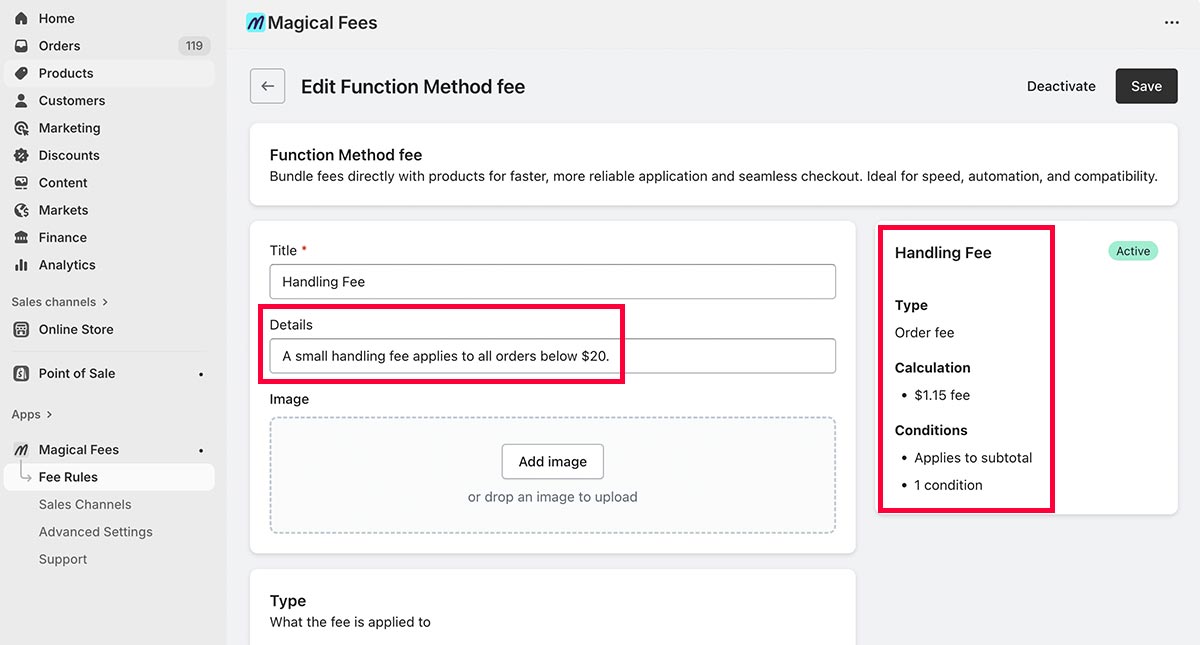
Once you have a threshold and fee amount, set up a rule in Magical Product Fees:
1. Create a new fee rule.
Name: something transparent like “Small order handling fee” or “Packaging & processing fee for small orders”.
2. Use an order-level fee.
Set the fee type to a fixed dollar amount per order (for example, $3.00).
3. Add a subtotal condition.
Configure the rule so it only applies when the cart subtotal is below your chosen threshold (for example, “apply when subtotal is less than $40”). This ensures larger, more profitable orders are never charged the fee.
4. Add any location conditions you care about.
If your small-order problem is worse in certain regions (for example, international shipments or remote domestic areas), you can limit the fee to those locations only.
5. Make the fee label customer-friendly.
Ensure the label shown in the cart and at checkout is clear and concise, such as “Small order handling fee” or “Handling & packaging fee for orders under $40”.
This keeps the fee visible and understandable, rather than surprising customers with a vague extra charge.
Step 3: Test, monitor, and tune
After you’ve configured the fee:
1. Place a few test orders
- One below your threshold to confirm the fee appears with the correct label and amount.
- One above your threshold to confirm no fee is added.
2. Watch key metrics over a few weeks
Pay particular attention to:
- Share of orders under your threshold (and whether some customers choose to add an extra item instead of paying the fee).
- Average order value (AOV) and gross margin.
- Conversion rate on your most common small-order funnels.
- Customer feedback: do people complain about the fee, or mostly accept it?
3. Adjust if needed
If you see pushback or a dip in conversion, consider:
- Lowering the fee amount slightly.
- Reducing the number of regions where you apply it.
- Pairing it with a simple message near your free-shipping threshold (for example, “Spend $40+ and we’ll waive the small order handling fee”).
Because Magical Product Fees treats the fee as a configurable rule, you can change or remove it in minutes as you learn from your data.
Supporting Answers
How big should my small-order handling fee be?
There’s no universal right number, but a good starting point is:
- Estimate your average per-order fulfillment and shipping cost for the smallest parcels.
- Compare it to the gross profit you earn on typical small orders under your threshold.
- Choose a fee that closes most of the gap without feeling unreasonable. This is often a few dollars on very small orders.
For example, if your analysis shows orders under $35 are consistently $3–$4 in the red, a $2–$3 fee plus a slightly higher free-shipping threshold may be enough to get those orders back into acceptable territory while still nudging customers toward larger baskets.
Handling fee vs. minimum order vs. free-shipping threshold
All three levers aim at the same issue–**tiny orders are expensive **–but they behave differently:
Handling fee
- Soft friction on small orders.- Easy to explain (“covers packaging and processing on very small orders”).- Gives customers a choice: pay the fee or add an item.
Minimum order value (MOV)
- Hard wall: “you must spend at least $X.”- Stronger protection for margins but can hurt conversion if customers feel blocked.
Free-shipping threshold
- Carrot instead of stick: “Spend $X to get free shipping.”- Encourages upsell but doesn’t directly address fixed handling cost on orders that don’t hit the threshold.
In practice, many stores use a combination: free shipping above a certain amount, normal shipping with no handling fee for mid-sized orders, and a modest small-order handling fee for the lowest baskets.
Will a handling fee annoy my customers?
Any extra fee can create friction if it feels hidden or unjustified. The goal is to keep it:
- Transparent: clear label like “Handling & packaging fee for orders under $40.”- Predictable: always applied under the same conditions.- Reasonable: small enough that it feels like a cost of service, not a penalty.
Transparency around shipping and handling charges is a common recommendation in ecommerce best-practice guides because it helps maintain trust and reduces surprises at checkout.
Speaking personally, my feeling is that while expensive shipping charges can be off-putting, when I see reasonable handling charges transparently disclosed and clearly explained, it's hard to feel upset. In fact, it builds a certain level of empathy. Any reasonable person will understand that there are additional costs involved in the process of shipping an order and that it might be unprofitable for the business to proceed without a handling fee in the case of a small order. It makes sense. You just need to be honest and upfront about it.
If you’re worried, start with a modest fee and watch your conversion and support inbox. You can always adjust or remove it if you see more downside than benefit.
How do I handle refunds and exceptions?
When you use the Magical Product Fees app, each fee is added to the order as its own line item. Behind the scenes, the app treats the fee as a product, which means you can:
- Refund just the handling fee if you decide it shouldn’t apply on a specific order (for example, a VIP customer or a service recovery situation), while leaving the rest of the order intact.- Keep a clear audit trail in Shopify showing when the fee was charged and when it was refunded.
This is useful if you occasionally waive the fee as a goodwill gesture, or if you learn that a particular order should be treated differently (for example, a wholesale partner or internal test order). You can correct the order in Shopify and ensure your accounting reflects the updated fee amount.
Always label deposits separately for compliance
Display bottle deposit fees as a clearly labeled, separate line item at checkout and on receipts. This meets regulatory transparency requirements, builds customer trust by showing exactly what they're paying, and makes it significantly easier to track deposits for reporting and audits. Use a clear label like "Bottle deposit" or "Container deposit (CRV)" so customers immediately understand the charge.