Address Ninja
Built for ShopifyStop failed deliveries before they ship
4.9 ★ (44 reviews) · Shopify App Store
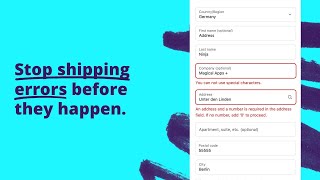
Catch bad addresses at checkout: missing house numbers, invalid postal codes, P.O. Boxes, and special characters, so every package arrives the first time.
Catch errors in real time
Addresses are validated the moment a customer enters them, before the order is placed.
Works on every Shopify plan
Professional address validation for all Shopify stores, not locked behind Shopify Plus.
Covers express checkout too
Validates addresses from PayPal Express, Google Pay, and Apple Pay so nothing slips through.
Use Cases
Address Ninja handles a wide range of fee scenarios — from government-mandated
DACH House Number Validation
Merchants shipping to Germany, Austria, Switzerland, and the Netherlands frequently report failed deliveries when addresses lack house numbers. Carriers like DHL, DPD, and PostNL require house numbers for successful delivery—without them, packages are returned or delayed. Address Ninja validates addresses in real time at checkout, blocking orders that omit house numbers so every shipment can be fulfilled on the first attempt.
Dutch Address Validation
Dutch e-commerce merchants shipping via PostNL and DPD need house numbers and proper address formatting for successful delivery. The Netherlands is one of the largest Address Ninja markets—merchants frequently report that missing house numbers cause failed deliveries and returns. Address Ninja validates Dutch addresses in real time, ensuring PostNL-compatible formatting before orders are placed.
Express Checkout Address Validation
Many merchants assume checkout validation requires Shopify Plus—it doesn't. Address Ninja validates addresses from Apple Pay, Google Pay, Shop Pay, and PayPal Express at checkout, so house numbers, PO Boxes, and postal code rules apply even when customers skip the standard checkout form. Merchants discover that express checkout was letting bad addresses through; Address Ninja closes that gap on all Shopify plans.
PO Box Blocking
Carriers like UPS, FedEx, and Startrack cannot deliver to PO Boxes—merchants discover this the hard way when packages are returned or undeliverable. Many assume enabling PO Box blocking covers every variation, but edge cases regularly slip through: addresses like "Box 20432", "HC Box", "Locked Bag", and parcel locker formats. Address Ninja blocks these variations at checkout so only deliverable addresses make it through.
Special Character & Non-Latin Blocking
European and international merchants often receive addresses with Cyrillic, Japanese, Hebrew, or Arabic characters that their fulfillment and WMS systems cannot process. These addresses pass through checkout but cause errors downstream—labels fail to print, integrations break, and orders get stuck. Address Ninja blocks non-Latin and special characters at checkout so only system-compatible addresses reach fulfillment.
ZIP & Postal Code Restrictions
Merchants selling regulated products—such as Kratom or other substances with state-level restrictions—need to block specific states or ZIP codes at checkout. Others restrict shipping to high-theft zones or limit delivery to a defined radius. Address Ninja validates postal and ZIP codes in real time, blocking orders destined for restricted regions before they are placed.
Features
Express Checkout Validation
Validate addresses from express checkout methods like PayPal Express, Google Pay, and Apple Pay. No address slips through unchecked.
Learn more →House Number & Street Validation
Block users from checkout without a house number and/or without a street name. Catch incomplete addresses before they become failed deliveries.
Learn more →P.O. Box Blocking
Block all P.O. Boxes with professional checkout validation and address validation. Prevent orders from shipping to undeliverable P.O. Box addresses.
Learn more →Special Character Blocking
Block users when the address contains non-Latin or special characters that cause delivery issues with certain carriers. Prevent problems before they happen.
Learn more →Works on All Shopify Stores
Works on all Shopify stores, not just Shopify Plus stores. Every merchant gets access to professional address validation at checkout.
Learn more →ZIP/Postal Code Validation
Ensure ZIP and postal codes match the expected format for the destination country. Block invalid or suspicious postal codes at checkout.
Learn more →How it works
Get up and running quickly — see our complete setup guide for step-by-step instructions.
Install the app
Add Address Ninja to your store. It integrates with your checkout automatically, no theme edits needed.
Choose your validation rules
Enable house-number checks, P.O. Box blocking, postal-code validation, and more with a few clicks.
Ship with confidence
Bad addresses are blocked before orders are placed, cutting failed deliveries and return costs.
Reviews
What merchants are saying about Address Ninja.
Merchants love how it catches address errors before they ship, works with every checkout flow, and has support that responds within hours.
“Provides many options for restricting data entry for address, name, email, etc. This helps us as we integrate our Shopify data across systems that have more restrictive rules than Shopify does. The company is easy to work with and responsive to requests for help or changes.”
“Moving from the custom checkout validations we had in place on checkout.liquid to Shopify's new checkout extensibility, we needed a solution that could achieve the same level of customization we previously had in place. Address Ninja was super easy to set up and their support team was top-notch as well.”
“Great app, highly recommended! And the live chat customer service has always been fantastic.”
Pricing
Simple, transparent pricing. Try free for 14 days.
Plans
Choose the plan that fits your store.
Starter
- House Number check
- P.O. Box check
- Apartment Suite check
- Special Characters check
- MeinEinkauf.ch check
- ZIP/Postal Code Format check
- ZIP/Postal Code Block check
Pro
- All from Basic
- Maximum Characters per field
- Custom Regex (non-latin characters)
Setup Guides
Step-by-step instructions to get Address Ninja configured correctly.
FAQs
Quick answers to common questions and troubleshooting for Address Ninja.
How do I block specific ZIP / postal codes with Address Ninja?
In your Shopify admin, go to Apps and open Address Ninja. Click ZIP / Postal Code Block. Search and add the countries where you want to block specific ZIP.
Read FAQ →How do I validate ZIP / postal code formats with Address Ninja?
From your Shopify admin, open Address Ninja and click ZIP / Postal Code Format Validation. Search and add the countries where you want to enforce proper ZIP / postal code formatting.
Read FAQ →Can I allow addresses in regions with unusual formats to bypass validation with Address Ninja?
No. There is no way to bypass validation for specific regions or customers at this time.
Read FAQ →Videos
Watch Address Ninja in action — demos, setup walkthroughs, and use case guides.
Articles
In-depth guides on strategy, comparisons, and advanced features.
How to Require Complete Addresses on Shopify Checkout (Apartment Numbers and PO Boxes)
Missing apartment numbers cause failed deliveries. Learn how to require Address Line 2 on Shopify & block PO Boxes without hurting conversion.
Read more →Compare the 5 Best Shopify Address Validation Apps (2025 Review)
Compare the best Shopify address validation apps to find one that prevents failed deliveries and improves checkout accuracy.
Read more →Why Every Shopify Store Needs Address Validation
Discover how address validation saves money, prevents failed deliveries, and keeps your customer data clean. Quick Answer Address mistakes at checkout lead.
Read more →Don't see what you're looking for?
Not sure which app or feature fits your store? Have a custom requirement? Reach out — we're happy to help.
Ready to get started?
Install Address Ninja on Shopify and see the difference today.
Install Address Ninja on Shopify